Simulate JVM Application Faults
Chaos Mesh simulates the faults of JVM application through Byteman. The supported fault types are as follows:
- Throw custom exceptions
- Trigger garbage collection
- Increase method latency
- Modify return values of a method
- Trigger faults by setting Byteman configuration files
- Increase JVM pressure
In addition, Chaos Mesh supports injecting the above faults into commonly used services or their Java clients. For example, when a MySQL Java client executes a specified type of SQL statement (SELECT, UPDATE, INSERT, REPLACE, or DELETE), you can use the JVM fault injection feature to inject latency or throw exceptions in this client.
This document describes how to use Chaos Mesh to create the above fault types of JVM experiments.
Your Linux kernel must be v4.1 or later.
Create experiments using Chaos Dashboard
-
Open Chaos Dashboard, and click NEW EXPERIMENT on the page to create a new experiment.
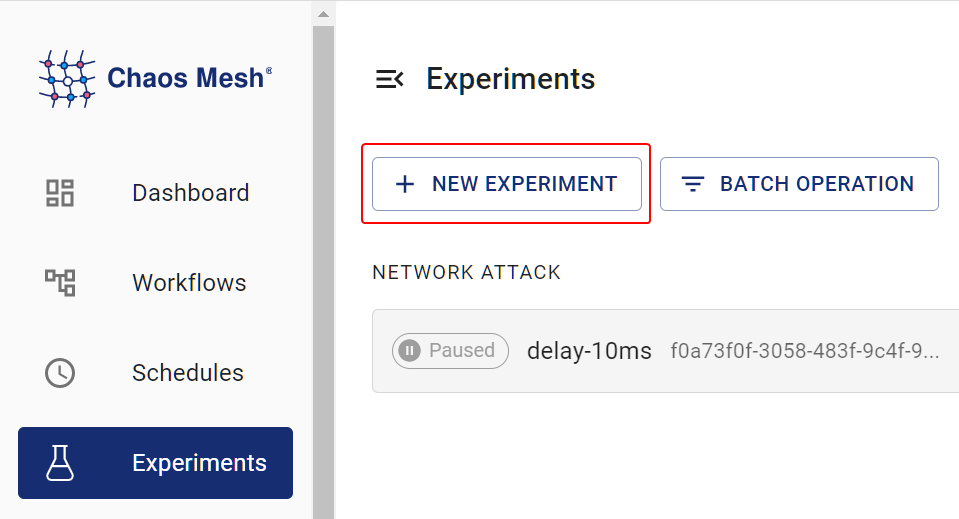
create a new experiment -
In the Choose a Target area, choose JVM FAULT, and select a specific behavior, such as
RETURN. Then, fill out the detailed configurations.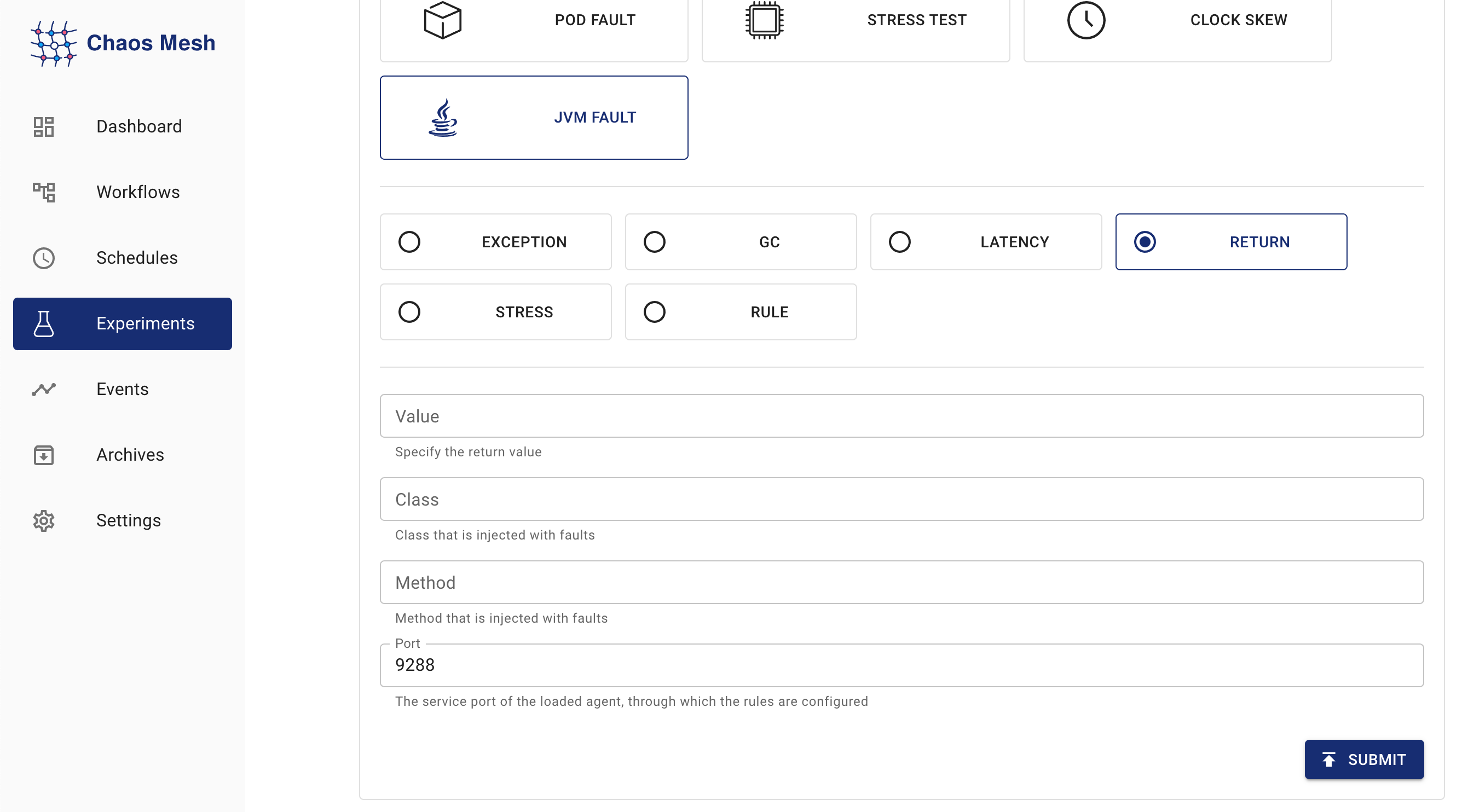
JVMChaos experiments For information about how to fill out the configurations, refer to Field Description.
-
Fill out the experiment information, and specify the experiment scope and the scheduled experiment duration.
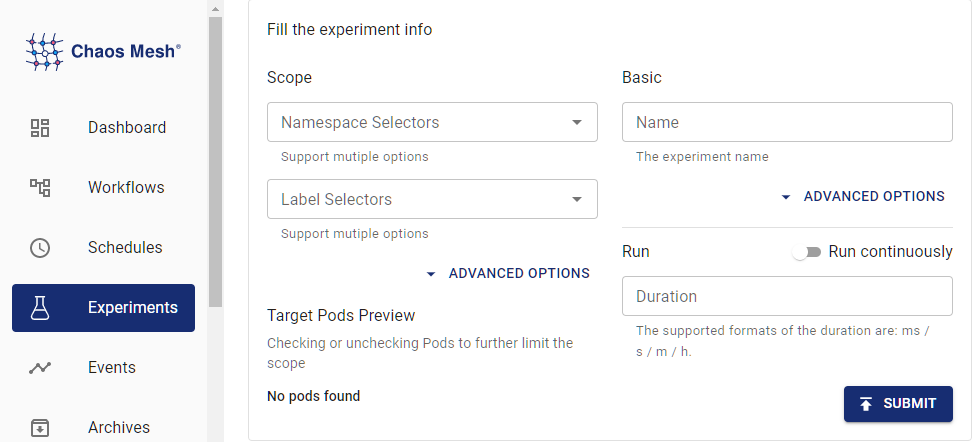
experiment information -
Submit the experiment information.
Create experiments using YAML files
The following example shows the usage and effects of JVMChaos. The example specifies the return values of a method. The YAML files referred to in the following steps can be found in examples/jvm. The default working directory for the following steps is also examples/jvm. The default namespace where Chaos Mesh is installed is chaos-mesh.
Step 1. Create the target application
Helloworld is a simple Java application. In this section, this application is used as the target application that is to be tested. The target application is defined in example/jvm/app.yaml as follows:
apiVersion: v1
kind: Pod
metadata:
  name: helloworld
  namespace: helloworld
spec:
  containers:
    - name: helloworld
      # source code: https://github.com/WangXiangUSTC/byteman-example/tree/main/example.helloworld
      # this application will print log like this below:
      # 0. Hello World
      # 1. Hello World
      # ...
      image: xiang13225080/helloworld:v1.0
      imagePullPolicy: IfNotPresent
-
Create the namespace for the target application:
kubectl create namespace helloworld -
Build the application Pod:
kubectl apply -f app.yaml -
Execute
kubectl -n helloworld get pods, and you are expected to find a pod namedhelloworldin thehelloworldnamespace.kubectl -n helloworld get podsThe result is as follows:
kubectl get pods -n helloworldNAME READY STATUS RESTARTS AGEhelloworld 1/1 Running 0 2mAfter the
READYcolumn turns to1/1, you can proceed to the next step.
Step 2. Observe application behaviors before injecting faults
You can observe the behavior of helloworld application before injecting faults, for example:
kubectl -n helloworld logs -f helloworld
The result is as follows:
0. Hello World
1. Hello World
2. Hello World
3. Hello World
4. Hello World
5. Hello World
You can see that helloworld outputs a line of Hello World every second, and the number of each line increases in turn.
Step 3. Inject JVMChaos and check
-
The JVMChaos with a specified return value is as follows:
apiVersion: chaos-mesh.org/v1alpha1kind: JVMChaosmetadata:name: returnnamespace: helloworldspec:action: returnclass: Mainmethod: getnumvalue: '9999'mode: allselector:namespaces:- helloworldJVMChaos changes the return value of the
getnummethod to the number9999, which means that the number of each line in thehelloworldoutput is set to9999. -
Inject JVMChaos with a specified value:
kubectl apply -f ./jvm-return-example.yaml -
Check the latest log of
helloworld:kubectl -n helloworld logs -f helloworldThe log is as follows:
Rule.execute called for return_0:0return executecaught ReturnException9999. Hello World
Field description
| Parameter | Type | Description | Default value | Required | Example |
|---|---|---|---|---|---|
action | string | Indicates the specific fault type. The available fault types include latency, return, exception, stress, gc, ruleData, and mysql. | None | Yes | return |
mode | string | Indicates how to select Pod. The supported modes include one, all, fixed, fixed-percent, and random-max-percent. | None | Yes | one |
The meanings of the different action values are as follows:
| Value | Meaning |
|---|---|
latency | Increase method latency |
return | Modify return values of a method |
exception | Throw custom exceptions |
stress | Increase CPU usage of Java process, or cause memory overflow (support heap overflow and stack overflow) |
gc | Trigger garbage collection |
ruleData | Trigger faults by setting Byteman configuration files |
mysql | Inject faults into MySQL Java clients |
For different action values, there are different configuration items that can be filled in.
Parameters for latency
| Parameter | Type | Description | Required |
|---|---|---|---|
class | string | The name of the Java class | Yes |
method | string | The name of the method | Yes |
latency | int | The duration of increasing method latency. The unit is millisecond. | Yes |
port | int | The port ID attached to the Java process agent. The faults are injected into the Java process through this ID. | No |
Parameters for return
| Parameter | Type | Description | Required |
|---|---|---|---|
class | string | The name of the Java class | Yes |
method | string | The name of the method | Yes |
value | string | Specifies the return value of the method. Currently, the item can be numeric and string types. If the item (return value) is string, double quotes are required, like "chaos". | Yes |
port | int | The port ID attached to the Java process agent. The faults are injected into the Java process through this ID. | No |
Parameters for exception
| Parameter | Type | Description | Required |
|---|---|---|---|
class | string | The name of the Java class | Yes |
method | string | The name of the method | Yes |
exception | string | The thrown custom exception, such as 'java.io.IOException("BOOM")'. | Yes |
port | int | The port ID attached to the Java process agent. The faults are injected into the Java process through this ID. | No |
Parameters for stress
| Parameter | Type | Description | Required |
|---|---|---|---|
cpuCount | int | The number of CPU cores used for increasing CPU stress. You must configure one item between cpu-count and mem-type. | No |
memType | string | The type of OOM. Currently, both 'stack' and 'heap' OOM types are supported. You must configure one item between cpu-count and mem-type. | No |
port | int | The port ID attached to the Java process agent. The faults are injected into the Java process through this ID. | No |
Parameters for gc
| Parameter | Type | Description | Required |
|---|---|---|---|
port | int | The port ID attached to the Java process agent. The faults are injected into the Java process through this ID. | No |
Parameters for ruleData
| Parameter | Type | Description | Required |
|---|---|---|---|
ruleData | string | Specifies the Byteman configuration data | Yes |
port | int | The port ID attached to the Java process agent. The faults are injected into the Java process through this ID. | No |
When you write the rule configuration file, take into account the specific Java program and the byteman-rule-language. For example:
RULE modify return value
CLASS Main
METHOD getnum
AT ENTRY
IF true
DO
    return 9999
ENDRULE
You need to escape the line breaks in the configuration file to the newline character "\n", and use the escaped text as the value of "rule-data" as follows:
\nRULE modify return value\nCLASS Main\nMETHOD getnum\nAT ENTRY\nIF true\nDO return 9999\nENDRULE\n"
Parameters for mysql
| Parameter | Type | Description | Required |
|---|---|---|---|
mysqlConnectorVersion | string | The version of the MySQL client (mysql-connector-java) used. Set it to "5" for the 5.X.X versions, and to "8" for the 8.X.X versions. The default value is "8". | No |
database | string | The name of the database to match. The default value is "", which matches all databases. | No |
table | string | The name of the table to match. The default value is "", which matches all tables. | No |
sqlType | string | The type of SQL to match. The available values are "select", "update", "insert", "replace", and "delete". The default value is "", which matches all types of SQL. | No |
exception | string | The thrown custom exception message, such as "BOOM". You must configure one of exception and latency. | No |
latency | int | The latency of executing the SQL. The unit is millisecond. You must configure one of exception and latency. | No |
port | int | The port ID attached to the Java process agent. The faults are injected into the Java process through this ID. | No |