GCP OAuth 认证
如果 Chaos Mesh 部署在 Google Cloud Platform 上,你可以通过 Google OAuth 登录 Chaos Dashboard。本文档介绍如何配置和启用这项功能。
创建 OAuth Client
根据 Setting up OAuth 2.0 创建 GCP OAuth 客户端,并获取 Client ID 与 Client Secret。
- 进入 Google Cloud Platform 控制台。
- 选择一个项目。
- 如果没有自动打开 APIs & services 页面,请在控制台的左侧菜单中手动选择 APIs & services。
- 点击位于左侧的 Credentials。
- 点击 Create Credentials,并选择 OAuth client ID。
- 应用类型选择 Web Application,填写应用名称以及 Chaos Dashboard 的重定向 URI。Chaos Dashboard 的重定向 URI 为
ROOT_URL/api/auth/gcp/callback,其中ROOT_URL是 Chaos Dashboard 的根地址,例如http://localhost:2333,可以通过helm的dashboard.rootUrl配置项进行配置。 - 点击创建。
创建完成后,即可获得该客户端的 Client ID 与 Client Secret,请保存这两项内容,供后续步骤使用。
填写配置并启动 Chaos Mesh
更新:从 v2.7.0 开始,你可以通过提供一个 Secret 来存储 Client ID 与 Client Secret。我们推荐使用这种方法。
这一改动是为了避免将 Client ID 与 Client Secret 暴露给公众。在之前的版本中,Client ID 与 Client Secret 直接写在 values 中,这通常是不安全的。
了解更多信息请参考 https://github.com/chaos-mesh/chaos-mesh/issues/4206。
要启用这项功能,需要修改 Chaos Mesh 的 Helm charts,设置以下配置项:
dashboard:
  rootUrl: http://localhost:2333
  gcpSecurityMode:
    enabled: true
    # Old configuration items for compatibility.
    clientId: ''
    clientSecret: ''
    # References existing Kubernetes secret containing `GCP_CLIENT_ID` and `GCP_CLIENT_SECRET`.
    existingSecret: ''
如果已经安装并运行了 Chaos Mesh,可以通过 helm upgrade 命令来更新配置;如果还未安装 Chaos Mesh,则可以通过 helm install 进行安装。
使用 Google 登录
打开 Chaos Dashboard,点击登录窗口下方的 Google 图标。
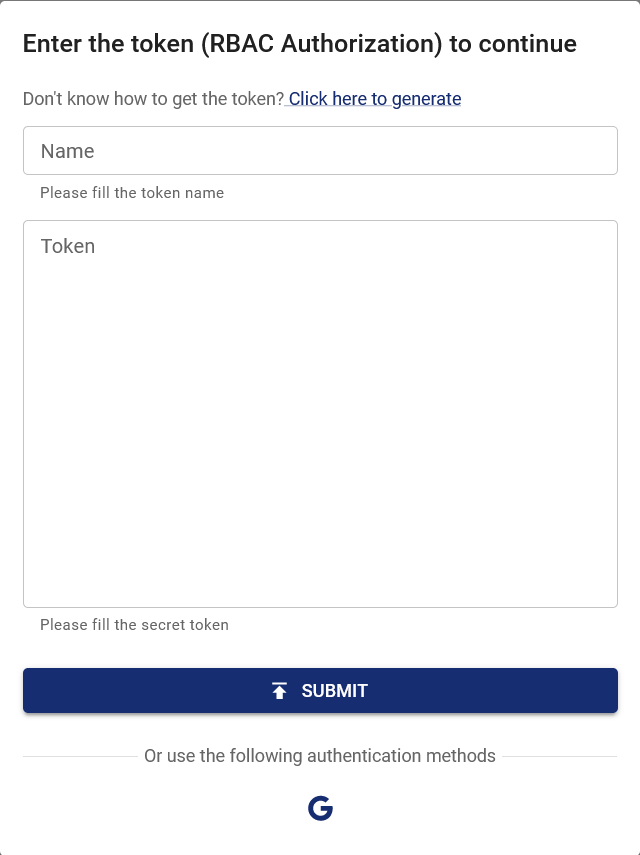
登录 Google 账号并授权 OAuth Client 后,页面会自动跳转至 Chaos Dashboard,并显示已登录状态。此时,你的权限与该 Google 账户在此集群中的权限一致。如需添加其他权限,可以通过 RBAC(基于角色的访问控制)进行配置,例如:
kind: ClusterRole
apiVersion: rbac.authorization.k8s.io/v1
metadata:
  name: chaos-mesh-cluster-manager
rules:
  - apiGroups:
      - chaos-mesh.org
    resources: ['*']
    verbs: ['get', 'list', 'watch', 'create', 'delete', 'patch', 'update']
---
kind: ClusterRoleBinding
apiVersion: rbac.authorization.k8s.io/v1
metadata:
  name: cluster-manager-binding
  namespace: chaos-mesh
subjects:
  - kind: User
    name: example@gmail.com
roleRef:
  kind: ClusterRole
  name: chaos-mesh-cluster-manager
  apiGroup: rbac.authorization.k8s.io
通过该配置,用户 example@gmail.com 可以查看和创建任何混沌实验。